Mastering JavaScript Animations
Thursday, July 11, 2024
Mastering JavaScript Animations
JavaScript animations are an essential tool for web developers, enabling them to create dynamic, interactive, and visually appealing web pages. From smooth transitions to interactive elements, mastering JavaScript animations can elevate user experience and create an engaging website. In this article, we will explore the basics of JavaScript animations, techniques to master them, and best practices to optimize performance.
What Are JavaScript Animations?
JavaScript animations involve manipulating DOM (Document Object Model) elements over time, changing their properties (such as position, size, or color) to create movement and dynamic effects. Unlike CSS animations, which are declarative and simpler to implement, JavaScript animations offer more control and flexibility. They allow developers to create complex animations, handle user interactions, and provide real-time adjustments.
Getting Started with JavaScript Animations
Before diving into the code, it's important to understand how JavaScript can manipulate elements. Animations are typically achieved using the requestAnimationFrame method, which allows smooth updates to the browser’s rendering loop. Here's a basic example of a simple animation:
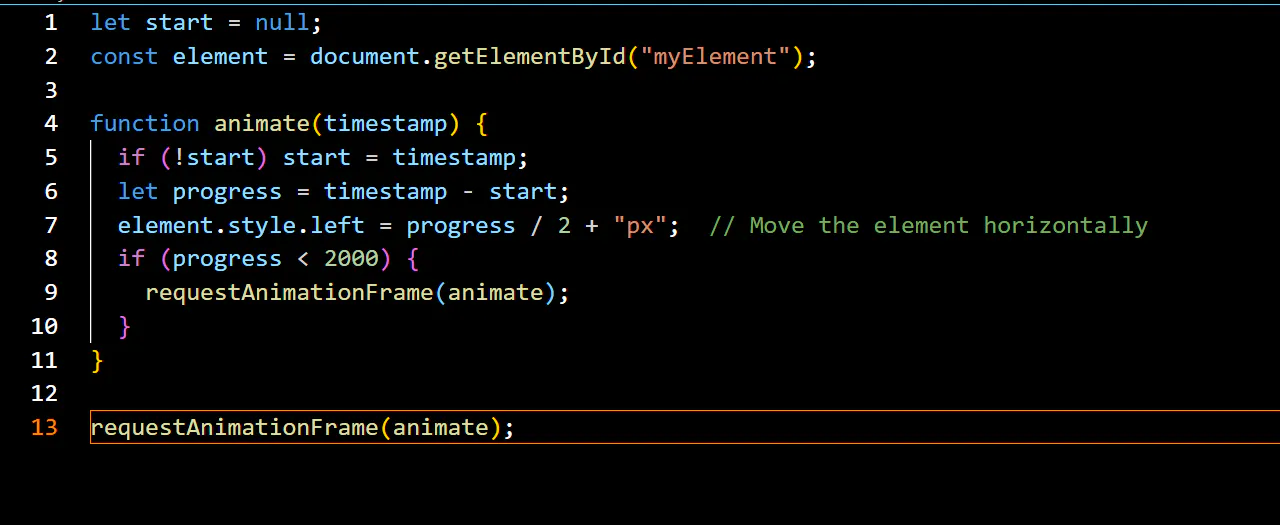
In this example, requestAnimationFrame ensures that the animation is smooth by syncing it with the browser’s refresh rate. The element moves horizontally, and the animation runs until 2 seconds have passed.
Key Animation Techniques
1. CSS Transitions + JavaScript
For simpler animations, CSS transitions can be used in combination with JavaScript. JavaScript can trigger the changes, and CSS handles the transition itself. For instance:
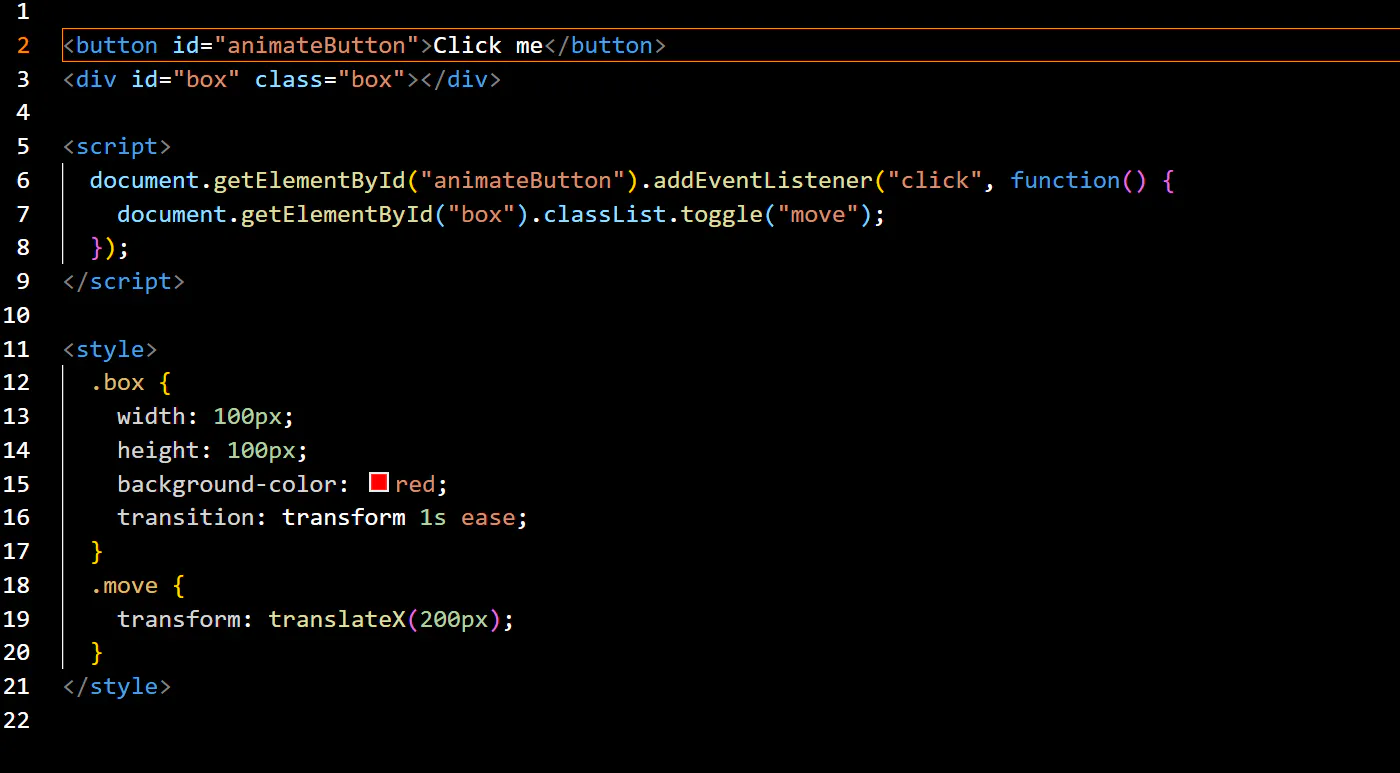
When the button is clicked, the box element moves to the right using CSS transitions. The transition is triggered by JavaScript, providing a smooth animation without manual frame-by-frame manipulation.
2. Tweens and Easing Functions
A common technique used in JavaScript animations is tweens. A tween is a smooth transition between two values over a set time. Libraries like GSAP (GreenSock Animation Platform) provide powerful tools for creating tweens and easing effects. Easing functions control the acceleration and deceleration of an animation, providing more natural movements.
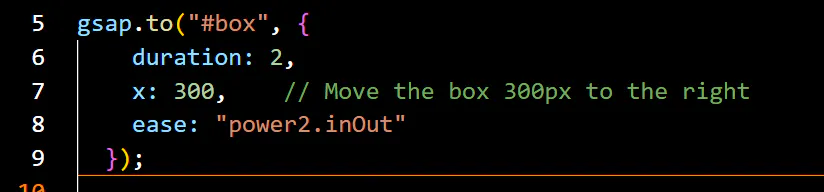
Using easing functions allows for animations that feel more realistic, mimicking real-world motion like acceleration and deceleration.
3. Keyframe Animations
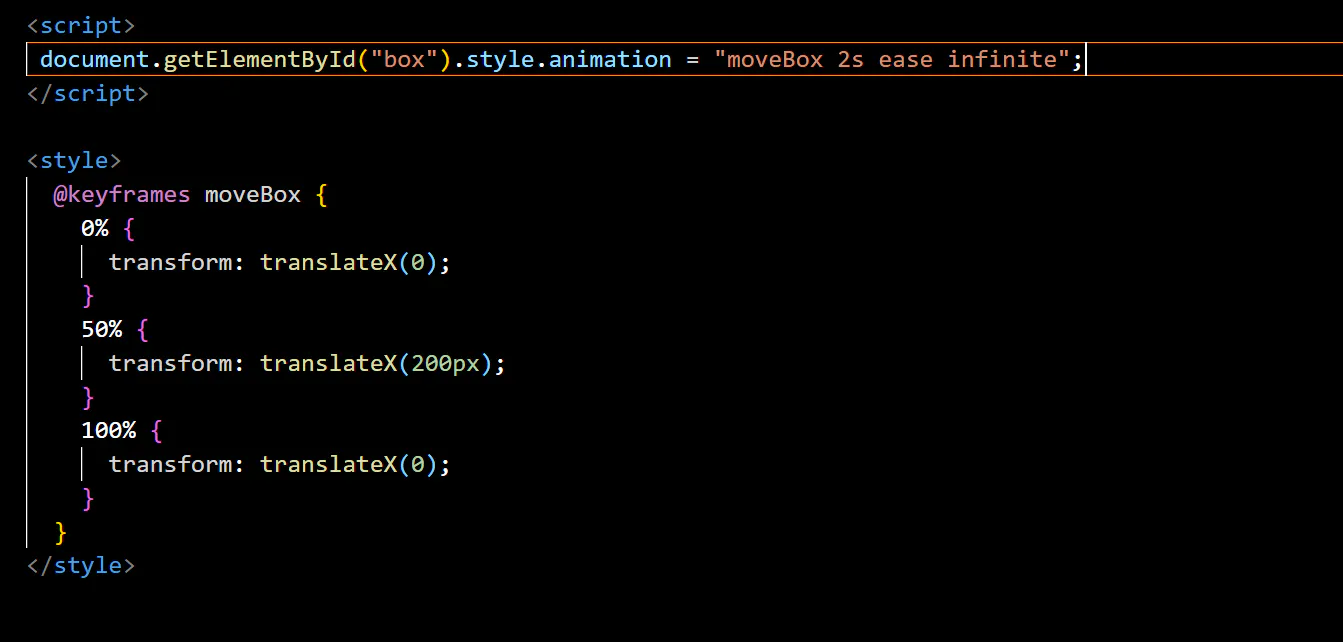
JavaScript can also be used to trigger CSS keyframe animations, which offer more control over the animation flow. This is useful for complex sequences or when precise timing is required.
Best Practices for Animations
1. Optimize Performance
Animations can be resource-intensive, especially on mobile devices or low-performance systems. To maintain smooth animations, it’s important to:
- Use requestAnimationFrame for smooth rendering, rather than setTimeout or setInterval, which may lead to stuttering.
- Minimize layout thrashing by modifying transform or opacity properties, which do not trigger reflow, unlike top, left, or width.
- Limit the number of simultaneous animations on a page to avoid overwhelming the browser’s rendering process.
2. Focus on User Experience
While animations can enhance the user experience, excessive or overly complex animations can lead to frustration or distraction. Follow these guidelines to create user-friendly animations:
- Keep animations short and purposeful. Use them to emphasize interactions, such as button presses or form submissions.
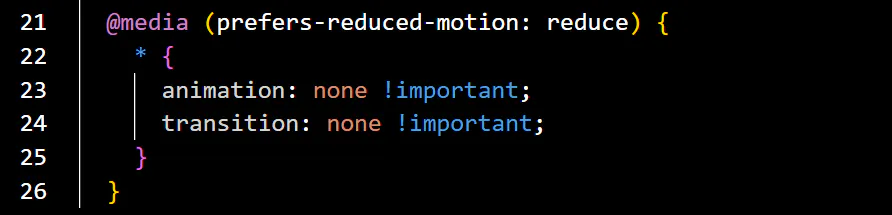
- Provide a way to disable animations. Some users may have motion sensitivity or prefer reduced motion for accessibility reasons. Respect these preferences by checking the prefers-reduced-motion media query.
3. Test Across Devices and Browsers
Testing animations on various devices and browsers is critical to ensure consistency. Performance may vary, and some features (like requestAnimationFrame) might not be supported in older browsers. Utilize tools like Can I Use to check compatibility.
Libraries for Advanced Animations
For more complex animations or time-saving solutions, JavaScript libraries are an excellent resource. Here are some popular options:
- GSAP (GreenSock Animation Platform): A powerful library for creating high-performance, complex animations with a simple API.
- Three.js: For 3D animations and graphics in the browser.
- PixiJS: A 2D rendering engine for fast and interactive animations.
These libraries offer a range of features that can simplify complex animations, offer better performance, and provide cross-browser support.
Conclusion
Mastering JavaScript animations is essential for creating interactive and visually appealing web experiences. By understanding the core principles and leveraging tools like requestAnimationFrame, CSS transitions, and popular animation libraries, you can bring your web projects to life. Remember to focus on performance and user experience, ensuring that your animations add to the overall usability of your site rather than detracting from it.